Macro Node
A downloadable Automation Tool for Windows
WindowsWPF .NET 8v0.9.0 alpha
Automation Made Simple
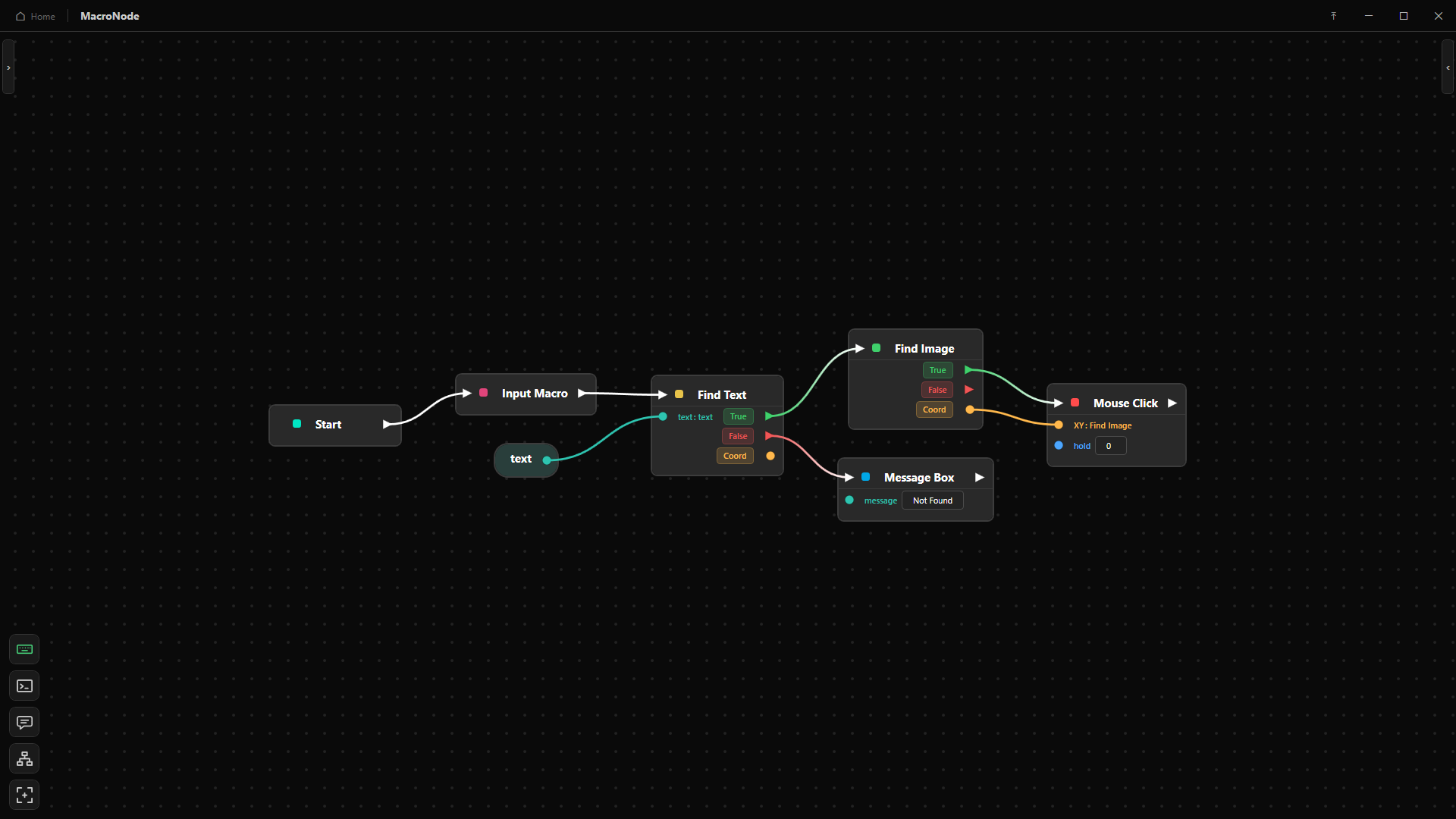
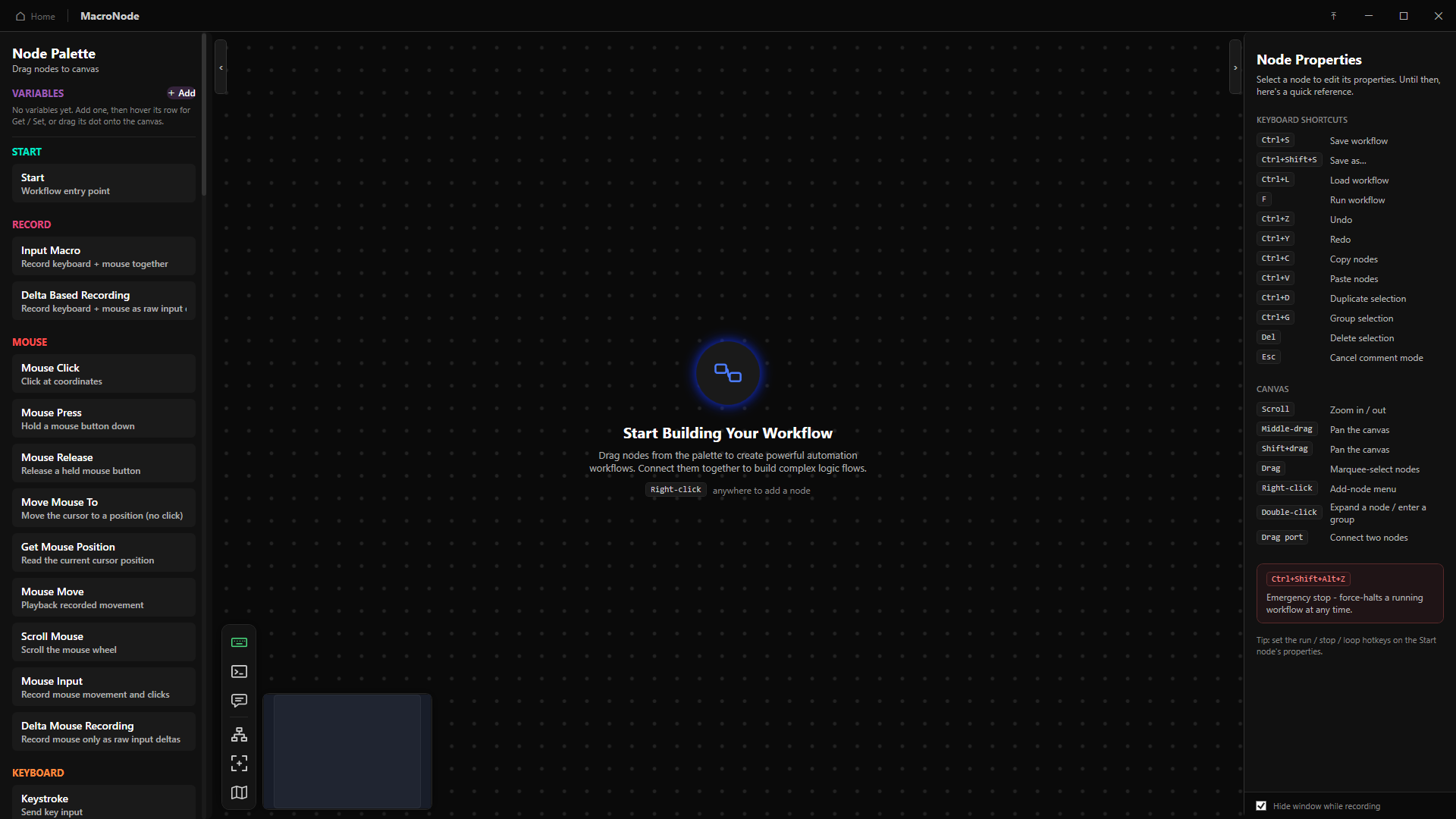
MacroNode is a visual, node based macro and automation editor. Drag nodes onto a canvas, wire them together, press a key. Move the mouse, type, wait, watch the screen for a pixel, an image or text, branch, loop, read and write files, all without writing a line of script.
 Coming soon to SteamMacroNodeWishlist on Steam
 CommunityBuild it with usJoin the server
Early prototype
MacroNode is in early, active prototyping. It is shared for people who want to test it, follow development and shape what gets built next.
Expect bugs, unexpected behaviour and the occasional crash. Nodes and UI may change significantly between updates. Do not rely on it for anything critical, and keep backups of important recordings and setups. Bug reports are genuinely appreciated, they decide what gets fixed first.
What it does
Node based editing
Build logic by wiring nodes instead of writing code. Comment boxes document a graph, and any selection collapses into a reusable group with its own typed inputs and outputs.
Input recording
Capture real mouse movement, clicks, key presses and combined input macros straight into nodes, then replay at an adjustable speed. Delta based recording handles raw input games.
Image and pixel detection
Multi scale template matching with a confidence threshold, a which match picker, live tracking, and pixel sample, branch, find, wait and reactive trigger nodes with a DPI correct eyedropper.
Text recognition, offline
Two engines per node: Fast on Windows, Accurate running PP OCRv5 locally. Preprocessing reads decorative game fonts and busy backgrounds, 8 of 8 test cases, with a whole screen read in about 245ms.
Branches, loops, parallel
If and Compare branching, Repeat and While with Break, and up to six Parallel branches on their own threads sharing variables. Error ports and an on fail policy on every risky node.
Typed variables
Number, Text, Boolean, Coordinate and Color, declared in a sidebar and dragged in as pills. Colour coded, type checked ports, XY split and merge, and variable templating in any text field.
A small formula language, everywhere it helps
Free form expressions reading variables by name: arithmetic, comparison, logic, and min, max, round, floor, ceil, abs, sqrt, clamp, random, dist, len, upper, lower, trim, contains, startswith, endswith, replace, format and if. Syntax highlighting, autocomplete, signature hints, a live type readout and undeclared name warnings, on both the node card and the properties panel.
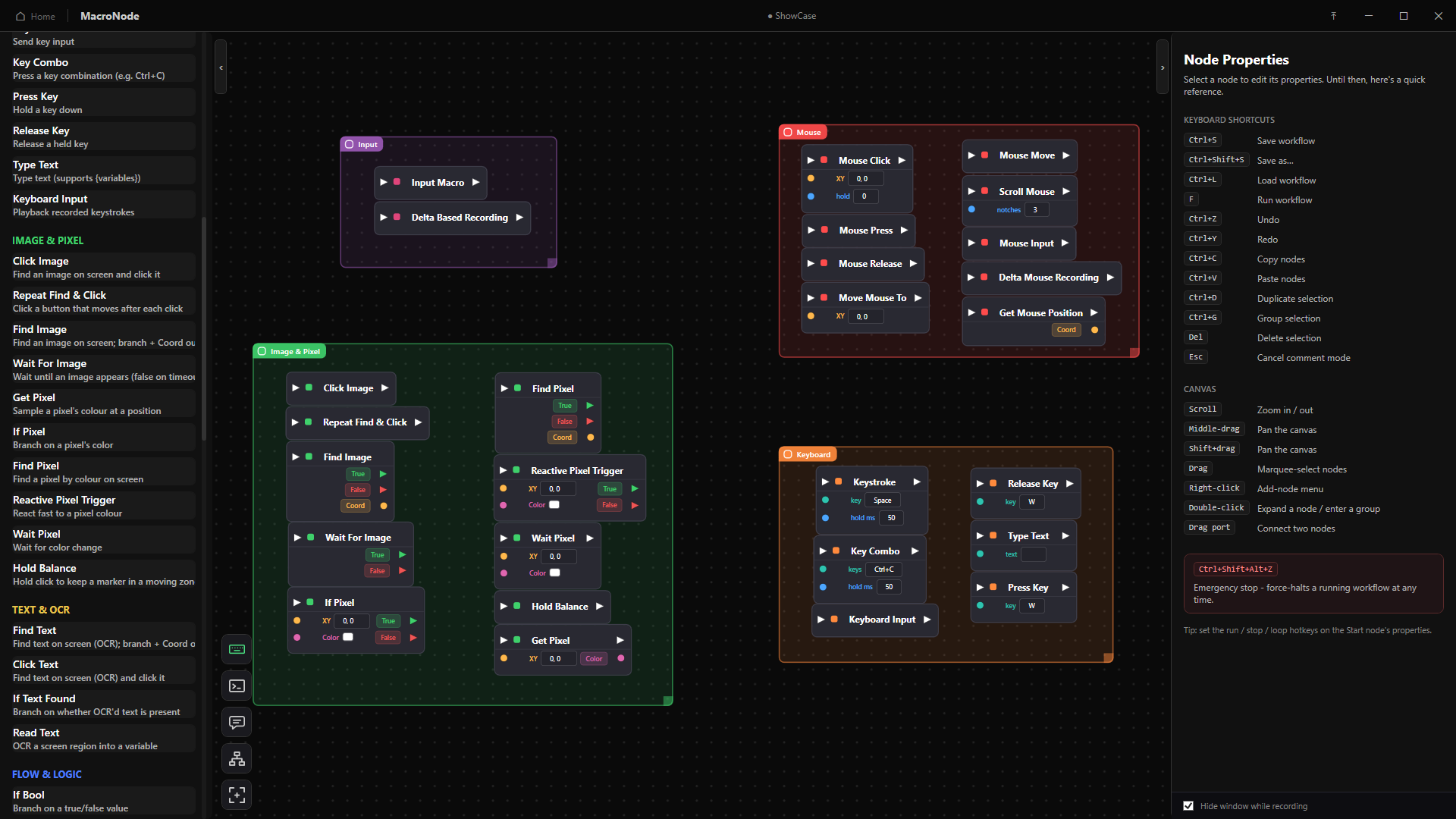
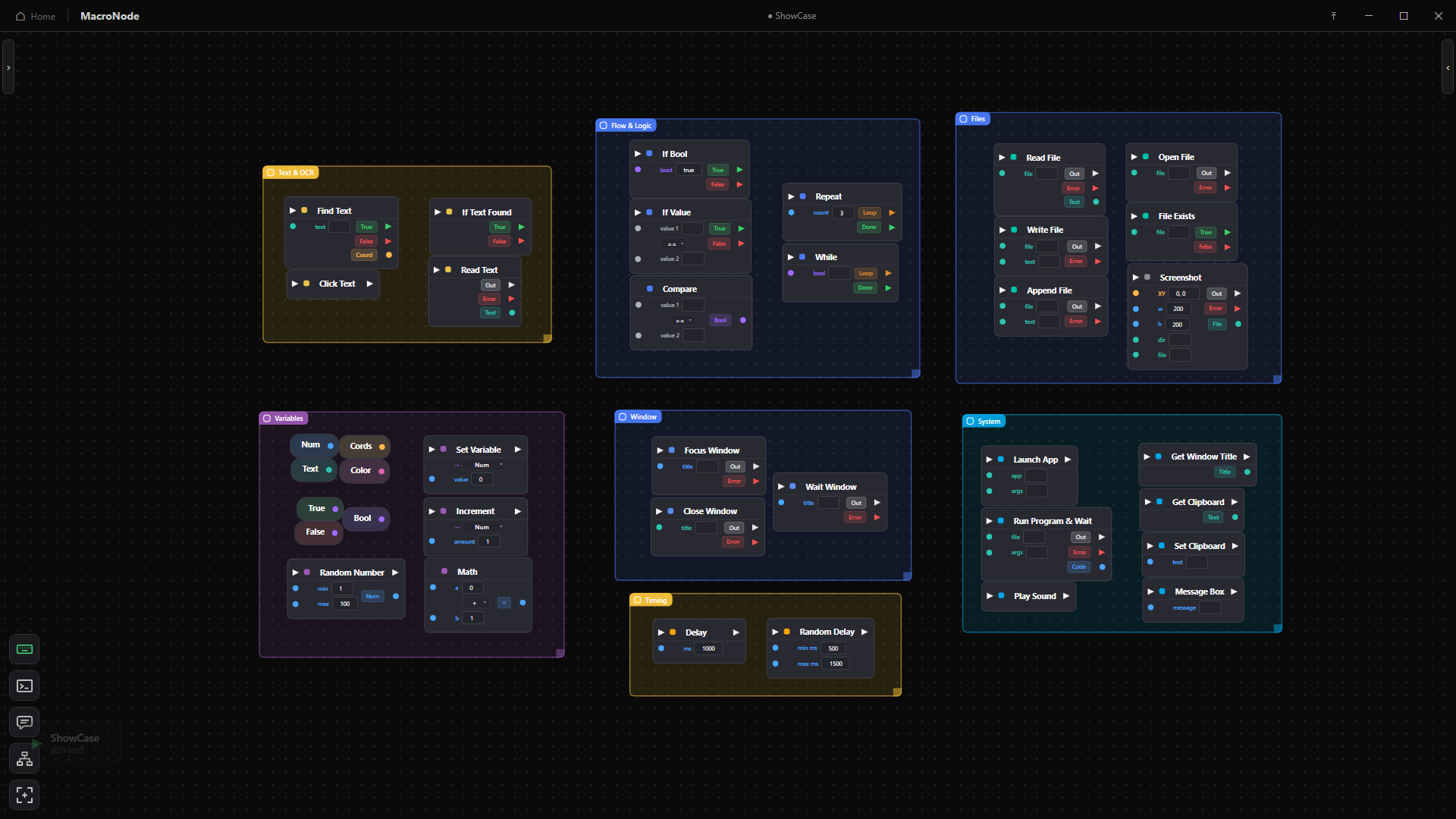
68 nodes, grouped
Record
Input MacroReplays a recorded mouse and keyboard sequenceDelta Based RecordingRecords relative mouse movement, for raw input gamesMouse InputReplays recorded mouse movement and clicks onlyKeyboard InputReplays a recorded key press sequence
Mouse
Mouse ClickClicks at a coordinate, or wherever the cursor already isMouse PressHolds a mouse button down until something releases itMouse ReleaseReleases a held mouse buttonMove Mouse ToMoves the cursor to an absolute coordinateGet Mouse PositionReads the cursor position into a coordinate variableMouse MoveMoves the cursor by an offset from where it isScroll MouseScrolls the wheel up or down by a set amount
Keyboard
KeystrokePresses and releases a single keyKey ComboSends a modifier combination such as Ctrl Shift APress KeyHolds a key down until something releases itRelease KeyReleases a held keyType TextTypes a string, with variable substitution
Image and pixel
Click ImageFinds a captured image on screen and clicks itRepeat Find and ClickKeeps finding and clicking every match it seesFind ImageLocates an image and stores its coordinateWait For ImagePauses until the image appears, or times outTrack ImageFollows a moving image and updates its coordinate liveGet PixelReads the colour of one pixel into a variableIf PixelBranches on whether a pixel matches a colourFind PixelSearches a region for the first matching colourTrack PixelFollows a colour as it moves across the screenReactive Pixel TriggerFires the moment a pixel changes, built for fast reactionsWait PixelPauses until a pixel becomes the target colourHold BalanceHolds a key to keep a moving bar inside its target zone
Text and OCR
Find TextLocates on screen text and stores its coordinateClick TextFinds text on screen and clicks itIf Text FoundBranches on whether target text is visibleRead TextReads a screen region into a text variableScreenshotCaptures a region or the whole screen to a file
Flow and logic
If BoolBranches on a true or false valueIf ValueBranches on a number or text comparisonCompareCompares two values and outputs the resultRepeatLoops a fixed number of timesWhileLoops for as long as a condition holdsParallelRuns up to six branches at once, on their own threadsBreakExits the loop it sits insideStopEnds the whole workflow immediately
Variables
ExpressionEvaluates a formula over your variablesNumberDeclares a number value on the canvasTextDeclares a text value on the canvasBooleanDeclares a true or false value on the canvasCoordinateDeclares an X and Y screen positionColorDeclares a colour, picked with the eyedropperTrueOutputs a constant trueFalseOutputs a constant falseSet VariableWrites a new value into an existing variableIncrementAdds to a number variable in placeMathAdds, subtracts, multiplies or divides two numbersSplit XYSplits a coordinate into separate X and Y numbersString OpJoins, trims, replaces or slices textRandom NumberPicks a random number inside a range
System and window
Launch AppStarts an application and carries straight onRun Program and WaitRuns a program and waits for it to exitPlay SoundPlays an audio alertGet Window TitleReads the active window title into a variableGet ClipboardReads the clipboard into a text variableSet ClipboardWrites text to the clipboardMessage BoxShows a dialog and pauses until it is dismissedLog to ConsoleWrites a line to the run log, for debuggingFocus WindowBrings a matching window to the frontClose WindowCloses a window by its titleWait WindowPauses until a matching window appears
Files and timing
Read FileReads a file into a text variableWrite FileWrites text to a file, replacing what was thereAppend FileAdds a line to the end of a fileOpen FileOpens a file with its default programFile ExistsBranches on whether a path exists on diskDelayWaits a fixed number of millisecondsRandom DelayWaits a random time in a range, for natural pacing
Run it your way
Keyboard bindings
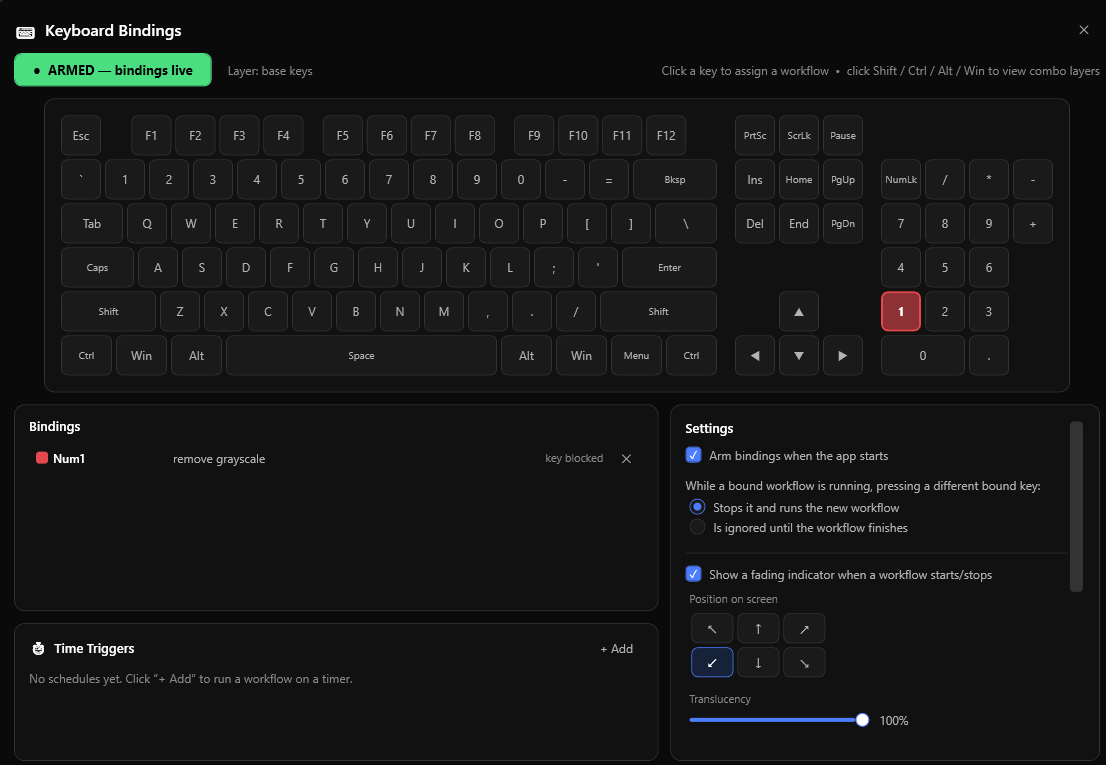
Workflow files run headless on a fresh executor. A low level hook passes through or suppresses each binding, with a virtual keyboard map and layers.
Macro wheel at the cursor
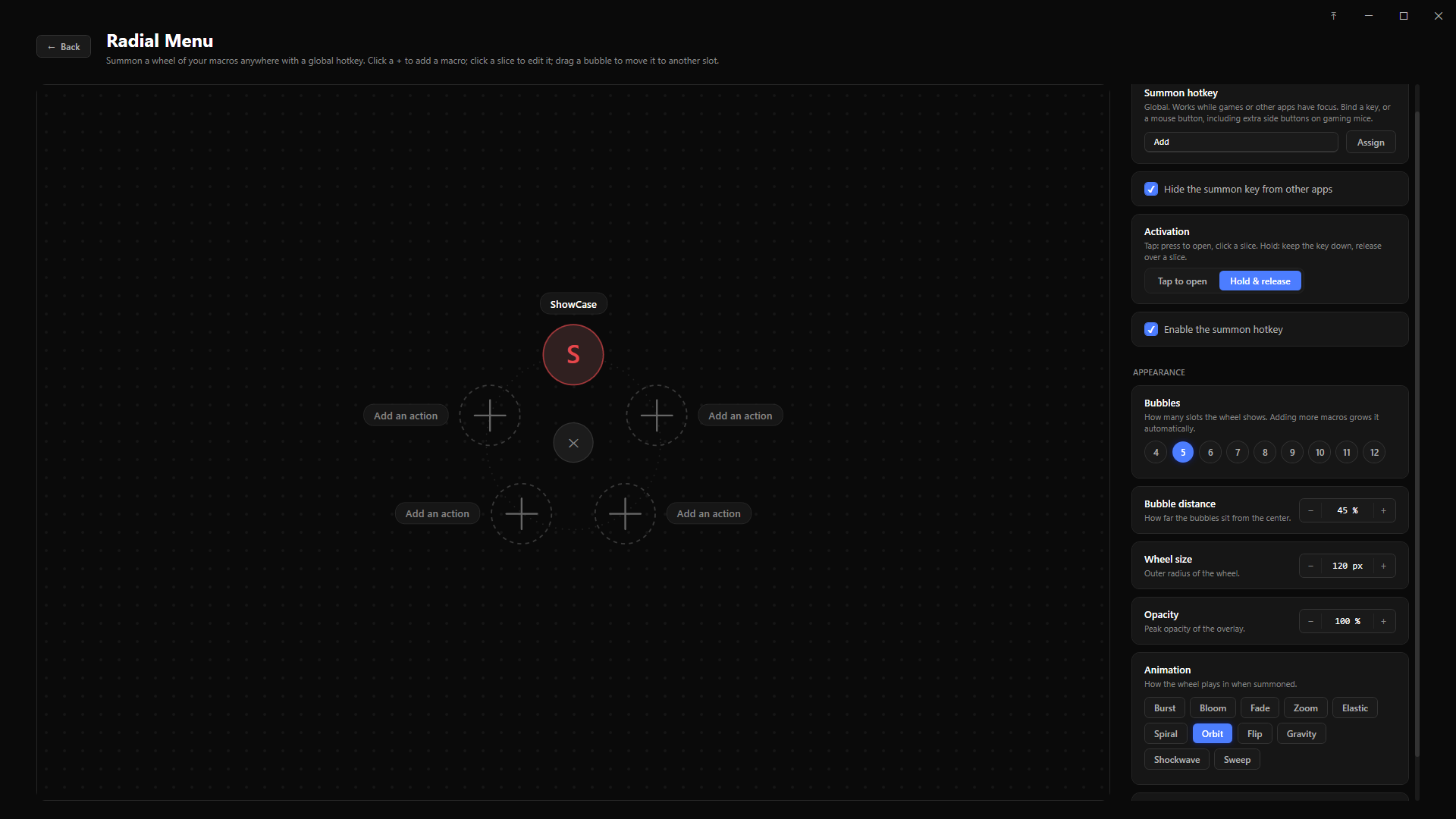
A global hotkey radial menu, toggle or hold, with per slice name, icon and colour. Summon it from a mouse button, including many button HID devices via Raw Input.
Time triggers
Every X, daily at a time, chosen weekdays, once on a date, or on app start. Live countdown cards, run now, only run between windows, catch up for missed runs, and an activity log.
Step through a run
Breakpoints with an amber spotlight, pause, resume and step on rebindable global keys, per branch breakpoints inside Parallel, a green glow on the executing node, and live variable values beside their names.
Editions
Full
- Unlimitedkeyboard bindingsand radial slices
- Time triggersand scheduling
- Save as Custom Nodeand per type defaults
- Full node catalogue, groups and Parallel
Demo
- One key binding, one radial slice
- Scheduling and custom node saving compiled out
- Full editor, canvas and debugging
- Self contained win x64 build
Install
Download the archive, extract it anywhere and run MacroNode.exe. No installer, no admin rights. Windows may warn about an unsigned binary, which is expected for an early prototype build. English and Spanish UI, switchable live, and saved workflows stay language independent.
Purchase
In order to download this Automation Tool you must purchase it at or above the minimum price of $6 USD. You will get access to the following files:
Download demo
Development log
- QOL updates, editing recorded macros,debugging customization17 days ago
- Expressions and Tutorial21 days ago
- Spanish support and play macros in reverse26 days ago
- Radial Menu, Minimap, and more!29 days ago
- Debugging and more35 days ago
- Node redesign36 days ago
- Variable and comparisons rework39 days ago
- Keyboard Binding and more41 days ago
Comments
Log in with itch.io to leave a comment.
I'll be dammed, this looks like another amazing macro
(also, you have a typo at "groe more complex")
Whoops, and thank you!! lol